In this blog post, we will perform point cloud classification using the PointNet architecture. We will use Python with Tensorflow and Keras framework. Let’s dive in!
1. Short Introduction to the Project
As discussed in the previous post, a point cloud is a set of data points in a 3D coordinate system. Point clouds are used in various applications such as autonomous vehicles, agriculture, and construction.
In this project, we will classify the shape of point clouds into several classes. The data is from Princeton 3D Shapenet’s, while the model is the PointNet architecture.
1.1. The Dataset
The Princeton 3D Shapenet ModelNet10 dataset consists of daily object such as chair, desk, and monitor. It has about 4900 point clouds data across 10 classes. The dataset link can be found here. Figure 1 below displays an example of the dataset.

There are 3991 data in the train set and 908 data in the test set. The data distribution of the train and test set is shown by Figure 2 and Figure 3. We can see an imbalanced class proportion within the dataset.
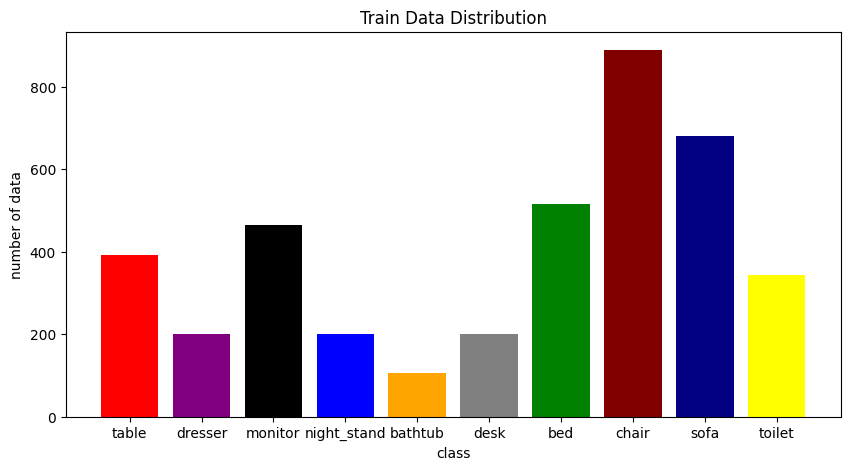
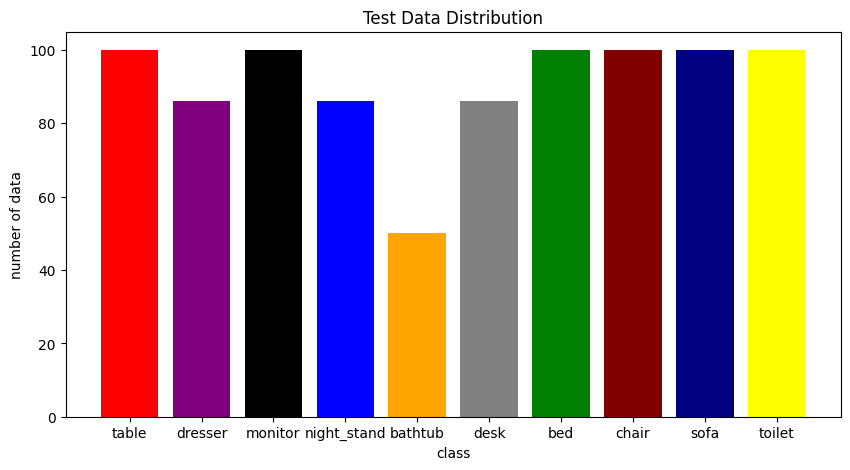
This project is only for learning purposes and focuses on building and training the model. Hence, we will not handle the imbalanced characteristic. There are common techniques like sampling, augmentation, or weighted loss function that may help solve this.
1.2. The Model
PointNet is a neural network architecture designed for processing and analyzing point clouds. The paper claims that, unlike most researches that depend on transforming point cloud data to 3D voxel grids, the PointNet model directly consumes point clouds data. PointNet is also permutation invariance, meaning that it produces the same output regardless of the order of input points. Figure 4 displays the PointNet architecture diagram.
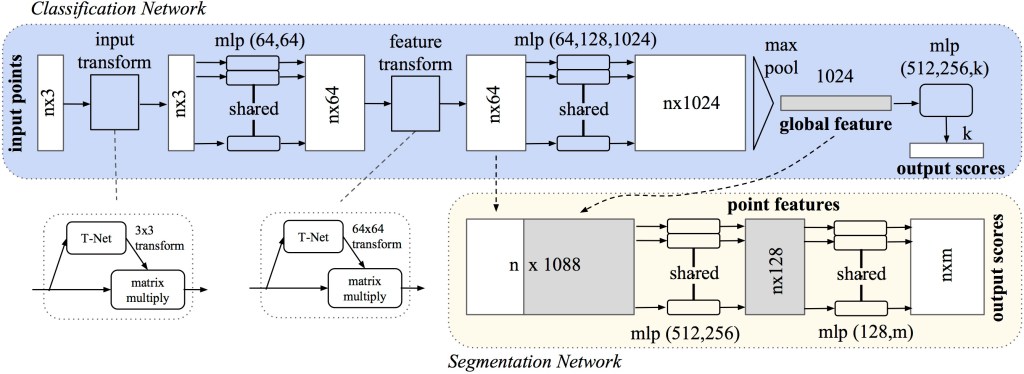
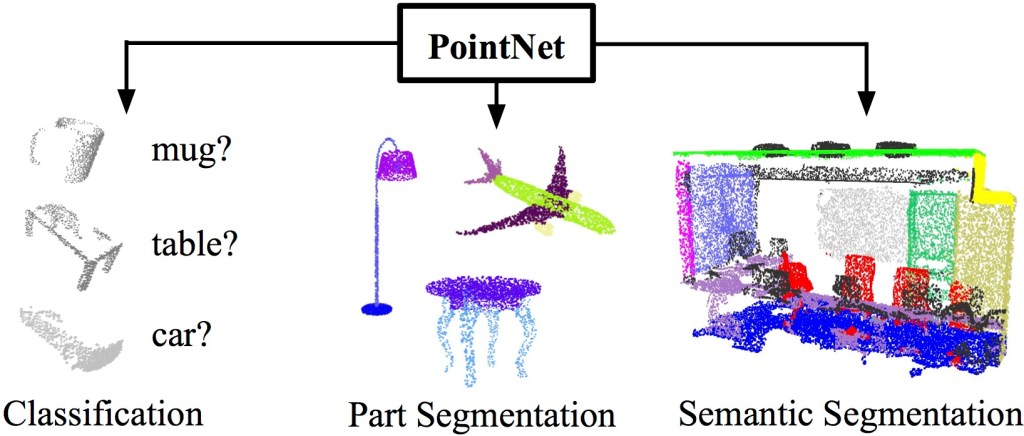
Figure 5 shows that PointNet can be used for classification, part segmentation, or semantic segmentation.
2. Setting Up
Now let’s set up your local environment. You need to clone the repo and install the necessary requirements. To do that, execute these commands in your terminal:
# Clone the repository
git clone https://github.com/arief25ramadhan/pointnet-classification.git

# Change current directory to the project repository
cd pointnet-classification

# Install the necessary python dependency
pip install -r requirements.txt
The repository of the project can be found here. Next, we will look at the data.
3. Load Data for Classifier
In loading the point cloud data, we need to use the trimesh library followed by conversion to numpy array.
# From dataset.py
import os
import glob
import trimesh
import numpy as np
import tensorflow as tf
from tensorflow import data as tf_data
import keras
from keras import layers
from matplotlib import pyplot as plt

class POINTCLOUD_DATA:

    def __init__(self, num_points=2048, num_classes=10, batch_size=32):
        self.data_dir = 'dataset/ModelNet10'
        self.num_points = num_points
        self.num_classes = num_classes
        self.batch_size = batch_size

    def parse_dataset(self):
        train_points = []
        train_labels = []
        test_points = []
        test_labels = []
        class_map = {}
        folders = glob.glob(os.path.join(self.data_dir, "[!README]*"))

        for i, folder in enumerate(folders):
            print("processing class: {}".format(os.path.basename(folder)))
            # store folder name with ID so we can retrieve later
            class_map[i] = folder.split("/")[-1]
            # gather all files
            train_files = glob.glob(os.path.join(folder, "train/*"))
            test_files = glob.glob(os.path.join(folder, "test/*"))

            for f in train_files:
                train_points.append(trimesh.load(f).sample(self.num_points))
                train_labels.append(i)

            for f in test_files:
                test_points.append(trimesh.load(f).sample(self.num_points))
                test_labels.append(i)

        return (
            np.array(train_points),
            np.array(test_points),
            np.array(train_labels),
            np.array(test_labels),
            class_map,
        )

    def augment(self, points, label):
        # jitter points
        points += tf.random.uniform(points.shape, -0.005, 0.005, dtype="float64")
        # shuffle points
        points = tf.random.shuffle(points)
        return points, label


    def get_dataset(self, train_points, test_points, train_labels, test_labels, train_size=0.8):

        dataset = tf_data.Dataset.from_tensor_slices((train_points, train_labels))
        test_dataset = tf_data.Dataset.from_tensor_slices((test_points, test_labels))
        train_dataset_size = int(len(dataset) * train_size)

        dataset = dataset.shuffle(len(train_points)).map(self.augment)
        test_dataset = test_dataset.shuffle(len(test_points)).batch(self.batch_size)

        train_dataset = dataset.take(train_dataset_size).batch(self.batch_size)
        validation_dataset = dataset.skip(train_dataset_size).batch(self.batch_size)

        return train_dataset, validation_dataset, test_dataset
4. Build the Point Net Classification Model
The code to build the model is:
# From model.py
import os
import glob
import trimesh
import numpy as np
from tensorflow import data as tf_data
from keras_core import ops
import keras
from keras import layers


class OrthogonalRegularizer(keras.regularizers.Regularizer):
    def __init__(self, num_features, l2reg=0.001):
        self.num_features = num_features
        self.l2reg = l2reg
        self.eye = ops.eye(num_features)

    def __call__(self, x):
        x = ops.reshape(x, (-1, self.num_features, self.num_features))
        xxt = ops.tensordot(x, x, axes=(2, 2))
        xxt = ops.reshape(xxt, (-1, self.num_features, self.num_features))
        return ops.sum(self.l2reg * ops.square(xxt - self.eye))


class POINTNET_MODEL:

    def __init__(self, num_points=2048, num_classes=10):
        self.num_points = num_points
        self.num_classes = num_classes

    def conv_bn(self, x, filters):
        x = layers.Conv1D(filters, kernel_size=1, padding="valid")(x)
        x = layers.BatchNormalization(momentum=0.0)(x)
        return layers.Activation("relu")(x)

    def dense_bn(self, x, filters):
        x = layers.Dense(filters)(x)
        x = layers.BatchNormalization(momentum=0.0)(x)
        return layers.Activation("relu")(x)

    def tnet(self, inputs, num_features):
        # Initalise bias as the indentity matrix
        bias = keras.initializers.Constant(np.eye(num_features).flatten())
        reg = OrthogonalRegularizer(num_features)

        x = self.conv_bn(inputs, 32)
        x = self.conv_bn(x, 64)
        x = self.conv_bn(x, 512)
        x = layers.GlobalMaxPooling1D()(x)
        x = self.dense_bn(x, 256)
        x = self.dense_bn(x, 128)
        x = layers.Dense(
            num_features * num_features,
            kernel_initializer="zeros",
            bias_initializer=bias,
            activity_regularizer=reg,
        )(x)
        feat_T = layers.Reshape((num_features, num_features))(x)
        # Apply affine transformation to input features
        return layers.Dot(axes=(2, 1))([inputs, feat_T])

    def get_model(self):

        inputs = keras.Input(shape=(self.num_points, 3))
        x = self.tnet(inputs, 3)
        x = self.conv_bn(x, 32)
        x = self.conv_bn(x, 32)
        x = self.tnet(x, 32)
        x = self.conv_bn(x, 32)
        x = self.conv_bn(x, 64)
        x = self.conv_bn(x, 512)
        x = layers.GlobalMaxPooling1D()(x)
        x = self.dense_bn(x, 256)
        x = layers.Dropout(0.3)(x)
        x = self.dense_bn(x, 128)
        x = layers.Dropout(0.3)(x)
        outputs = layers.Dense(self.num_classes, activation="softmax")(x)
        model = keras.Model(inputs=inputs, outputs=outputs, name="pointnet")
        # model.summary()

        return model
5. Train the Model
The code to train the model code is:
# From train.py
import os
import pickle
import glob
import trimesh
import numpy as np
from tensorflow import data as tf_data
import keras_core
from keras_core import ops
import tensorflow as tf
import keras
from keras import layers
from matplotlib import pyplot as plt
from dataset import POINTCLOUD_DATA
from model import POINTNET_MODEL, OrthogonalRegularizer

# Load dataset
print("Load Data")
data = POINTCLOUD_DATA()
train_points, test_points, train_labels, test_labels, CLASS_MAP = data.parse_dataset()
train_dataset, validation_dataset, test_dataset = data.get_dataset(train_points, test_points, train_labels, test_labels)

with open('model/class_map.pkl', 'wb') as handle:
    pickle.dump(CLASS_MAP, handle, protocol=pickle.HIGHEST_PROTOCOL)

# Load model
print("Load Model")
pointnet = POINTNET_MODEL()
model = pointnet.get_model()

model.compile(
    loss="sparse_categorical_crossentropy",
    optimizer=keras.optimizers.Adam(learning_rate=0.001),
    metrics=["sparse_categorical_accuracy"],
)

# Train model
print("Train Model")
checkpoint_path = "model/pointnet.weights.h5"
checkpoint_dir = os.path.dirname(checkpoint_path)

# Create a callback that saves the model's weights
cp_callback = tf.keras.callbacks.ModelCheckpoint(filepath=checkpoint_path,
                                                save_weights_only=True,
                                                monitor='val_sparse_categorical_accuracy',
                                                mode='max',
                                                save_best_only=True,
                                                verbose=1)

model.fit(train_dataset, epochs=20, validation_data=validation_dataset, callbacks=[cp_callback])
6. Inference
The inference function is shown below. To perform inference, we need to load the dataset and model before performing the prediction
# From inference.py file
import os
import glob
import pickle
import trimesh
import numpy as np
import tensorflow as tf
from tensorflow import data as tf_data
import keras
from keras import layers
import keras_core
from keras_core import ops
from matplotlib import pyplot as plt
from dataset import POINTCLOUD_DATA
from model import POINTNET_MODEL, OrthogonalRegularizer

# Load model
print("Load Model")
pointnet = POINTNET_MODEL()
model = pointnet.get_model()
model_weights_path = 'model/pointnet.weights.h5'
model.load_weights(model_weights_path)

# Load data points
test_path = 'dataset/ModelNet10/toilet/test/toilet_0428.off'
points = np.array([trimesh.load(test_path).sample(2048)])

# Prediction
preds = model.predict(points)
preds = ops.argmax(preds, -1)

# Load class map
with open('model/class_map.pkl', 'rb') as handle:
    CLASS_MAP = pickle.load(handle)

label = (os.path.basename(test_path)).split('_')[0]

print("Label: ", label)
print("Prediction: ", CLASS_MAP[preds[0].numpy()])

# Plot image
fig = plt.figure(figsize=(5, 5))
ax = fig.add_subplot(projection="3d")
ax.scatter(points[0, :, 0], points[0, :, 1], points[0, :, 2])
ax.set_title("label: {} \n prediction: {}".format(label, CLASS_MAP[preds[0].numpy()]))
ax.set_axis_off()
plt.savefig('assets/test_inference.png')
# plt.show()
7. Conclusion
After training the model for 20 epochs, the models achieved an accuracy of 80% on the validation set. Note that this project is only for learning purposes. Creating the most accurate model, which requires a lot of tuning and training, is not our priority. Visually, the inference result of the model is shown by Figure 6 below.

All codes displayed in this post can be found in the project’s github page.
***
Sources:
- Qi, C. R., Su, H., Mo, K., & Guibas, L. J. (2017). Pointnet: Deep learning on point sets for 3d classification and segmentation. In Proceedings of the IEEE Conference on Computer Vision and Pattern Recognition.
- Griffiths, D. (n.d.). Original notebook by David Griffiths. Retrieved from https://colab.research.google.com/github/keras-team/keras-io/blob/master/examples/vision/ipynb/pointnet.ipynb#scrollTo=GqHrVYP5bQKn
- Griffiths, D. (n.d.). Point cloud classification with PointNet. Retrieved from https://keras.io/examples/vision/pointnet/
 integerai.blog
Leave a comment