In this project, we will create a vehicle tracking and counting system using YOLOv8 and ByteTrack algorithms. Let’s dive in!
1. Short Introduction to the Project
Vehicle tracking and counting refers to the process of monitoring and recording the movement of vehicles within a defined area. This involves identifying vehicles as they enter and exit the monitored area. Figure 1 shows a typical vehicle tracking and counting system.
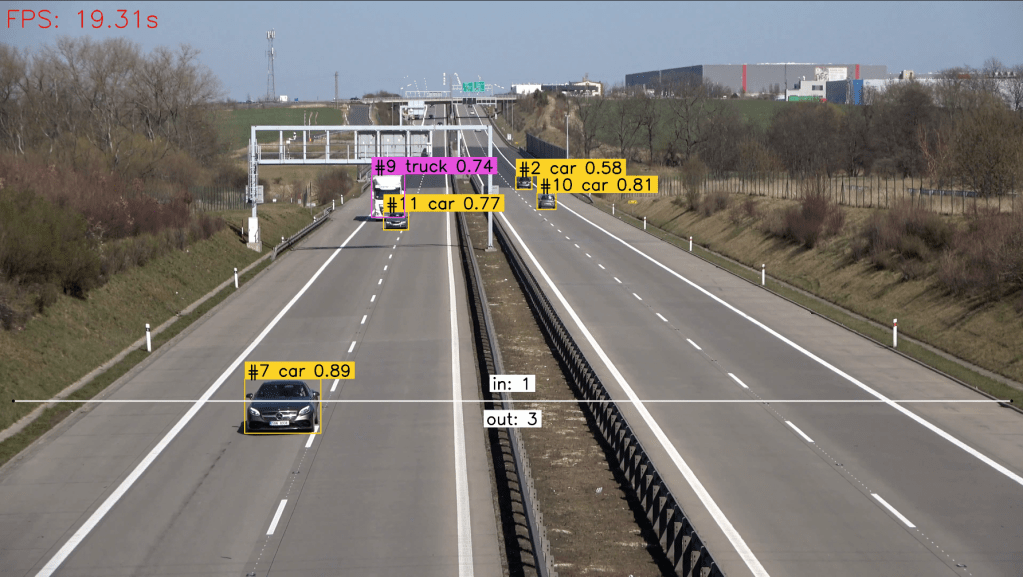
This system is commonly used in traffic management and security applications to gather data on vehicle flow and congestion levels for analysis and decision-making purposes. In short, the components of the project:
- YOLOv8: is an object detection algorithm known for its speed. Unlike traditional methods that divide the image into grids and predict bounding boxes and probabilities for each grid cell, YOLO processes the entire image at once, making it significantly faster while maintaining high precision.
- ByteTrack: is an object tracking system that utilizes a novel approach based on center points, which reduces computational complexity and improves tracking accuracy.
When combined, YOLOv8 and ByteTrack offer a comprehensive solution for vehicle tracking and counting in real-time scenarios.
2. Setting Up
The full project’s code can be viewed in this repository. The first step is setting up your environment to be able to run the code. Execute these commands in your terminal to start setting up:
# Clone the project repository
git clone https://github.com/arief25ramadhan/vehicle-tracking-counting.git

# Install project requirements
cd vehicle-tracking-counting
pip install -r requirements.txt

# inside current repo, clone ByteTrack Repository
git clone https://github.com/ifzhang/ByteTrack.git

# Install additional requirements
cd ByteTrack

# workaround related to https://github.com/roboflow/notebooks/issues/80
sed -i 's/onnx==1.8.1/onnx==1.9.0/g' requirements.txt

pip install -r requirements.txt

python3 setup.py develop
pip install cython_bbox onemetric loguru lap thop
3. Code
Next, we will dig into the code. First, we need to import the required libraries in the main.py file. We use the supervision libraries to help with image or video processing and line counting.
# main.py, import libraries
import os
import cv2
import sys
import time
import numpy as np
from utils import *
from tqdm import tqdm
from ultralytics import YOLO
from supervision.draw.color import ColorPalette
from supervision.geometry.dataclasses import Point
from supervision.video.dataclasses import VideoInfo
from supervision.video.source import get_video_frames_generator
from supervision.video.sink import VideoSink
from supervision.tools.detections import Detections, BoxAnnotator
from supervision.tools.line_counter import LineCounter, LineCounterAnnotator
from yolox.tracker.byte_tracker import BYTETracker, STrack
Note that we import functions from utils. The utils.py file should contains:
import yolox
import numpy as np
from typing import List
from yolox.tracker.byte_tracker import BYTETracker, STrack
from onemetric.cv.utils.iou import box_iou_batch
from dataclasses import dataclass
from supervision.tools.detections import Detections, BoxAnnotator

@dataclass(frozen=True)
class BYTETrackerArgs:
    track_thresh: float = 0.25
    track_buffer: int = 30
    match_thresh: float = 0.8
    aspect_ratio_thresh: float = 3.0
    min_box_area: float = 1.0
    mot20: bool = False

# converts Detections into format that can be consumed by match_detections_with_tracks function
def detections2boxes(detections: Detections) -> np.ndarray:
    return np.hstack((
        detections.xyxy,
        detections.confidence[:, np.newaxis]
    ))

# converts List[STrack] into format that can be consumed by match_detections_with_tracks function
def tracks2boxes(tracks: List[STrack]) -> np.ndarray:
    return np.array([
        track.tlbr
        for track
        in tracks
    ], dtype=float)

# matches our bounding boxes with predictions
def match_detections_with_tracks(
    detections: Detections,
    tracks: List[STrack]
) -> Detections:
    if not np.any(detections.xyxy) or len(tracks) == 0:
        return np.empty((0,))

    tracks_boxes = tracks2boxes(tracks=tracks)
    iou = box_iou_batch(tracks_boxes, detections.xyxy)
    track2detection = np.argmax(iou, axis=1)

    tracker_ids = [None] * len(detections)

    for tracker_index, detection_index in enumerate(track2detection):
        if iou[tracker_index, detection_index] != 0:
            tracker_ids[detection_index] = tracks[tracker_index].track_id

    return tracker_ids
Now, let’s go back to the main.py to set up the vehicle and tracker class
class vehicle_tracker_and_counter:

    def __init__(self,
                source_video_path="assets/vehicle-counting.mp4",
                target_video_path="assets/vehicle-counting-result.mp4",
                use_tensorrt=False):

        # YOLOv8 Object Detector
        self.model_name = "yolov8x.pt"
        self.yolo = YOLO(self.model_name)

        if use_tensorrt:
            try:
                # Try to load model if it is already exported
                self.model = YOLO('yolov8x.engine')
            except:
                # Export model
                self.yolo.export(format='engine')  # creates 'yolov8x.engine'
                # Load the exported TensorRT model
                self.model = YOLO('yolov8x.engine')
        else:
            self.model = self.yolo
            self.model.fuse()

        self.CLASS_NAMES_DICT = self.yolo.model.names
        self.CLASS_ID = [2, 3, 5, 7]

        # Line for counter
        self.line_start = Point(50, 1500)
        self.line_end = Point(3840-50, 1500)

        # BYTETracke Object Tracker
        self.byte_tracker = BYTETracker(BYTETrackerArgs())

        # Video input and output path
        self.source_video_path = source_video_path
        self.target_video_path = target_video_path

        # Create VideoInfo instance
        self.video_info = VideoInfo.from_video_path(self.source_video_path)
        # Create frame generator
        self.generator = get_video_frames_generator(self.source_video_path)
        # Create LineCounter instance
        self.line_counter = LineCounter(start=self.line_start, end=self.line_end)
        # Create instance of BoxAnnotator and LineCounterAnnotator
        self.box_annotator = BoxAnnotator(color=ColorPalette(), thickness=4, text_thickness=4, text_scale=2)
        self.line_annotator = LineCounterAnnotator(thickness=4, text_thickness=4, text_scale=2)


    def run(self):
        # Open target video file
        with VideoSink(self.target_video_path, self.video_info) as sink:
            # loop over video frames
            for frame in tqdm(self.generator, total=self.video_info.total_frames):
                # model prediction on single frame and conversion to supervision Detections
                start_time = time.time()
                results = self.model(frame)
                end_time = time.time()
                fps = np.round(1/(end_time - start_time), 2)
                cv2.putText(frame, f'FPS: {fps}s', (20,100), cv2.FONT_HERSHEY_SIMPLEX, 3, (0,0,255), 3)

                detections = Detections(
                    xyxy=results[0].boxes.xyxy.cpu().numpy(),
                    confidence=results[0].boxes.conf.cpu().numpy(),
                    class_id=results[0].boxes.cls.cpu().numpy().astype(int)
                )
                # filtering out detections with unwanted classes
                mask = np.array([class_id in self.CLASS_ID for class_id in detections.class_id], dtype=bool)
                detections.filter(mask=mask, inplace=True)
                # tracking detections
                tracks = self.byte_tracker.update(
                    output_results=detections2boxes(detections=detections),
                    img_info=frame.shape,
                    img_size=frame.shape
                )
                tracker_id = match_detections_with_tracks(detections=detections, tracks=tracks)
                detections.tracker_id = np.array(tracker_id)
                # filtering out detections without trackers
                mask = np.array([tracker_id is not None for tracker_id in detections.tracker_id], dtype=bool)
                detections.filter(mask=mask, inplace=True)
                # format custom labels
                labels = [
                    f"#{tracker_id} {self.CLASS_NAMES_DICT[class_id]} {confidence:0.2f}"
                    for _, confidence, class_id, tracker_id
                    in detections
                ]
                # updating line counter
                self.line_counter.update(detections=detections)
                # annotate and display frame
                frame = self.box_annotator.annotate(frame=frame, detections=detections, labels=labels)
                self.line_annotator.annotate(frame=frame, line_counter=self.line_counter)
                sink.write_frame(frame)
To run the code, we call the vehicle tracking and counting class and execute the run function as follows
if __name__ == '__main__':

    input_video="assets/vehicle-counting.mp4"
    output_video="assets/vehicle-counting-result.mp4"
    pipeline = vehicle_tracker_and_counter(source_video_path=input_video, target_video_path=output_video, use_tensorrt=True)
    pipeline.run()
4. Results
In conclusion, we have built a vehicle tracking and counting using YOLOv8 and ByteTrack. By harnessing the power of computer vision and deep learning, authorities can gain valuable insights into traffic dynamics, leading to more efficient, safer, and sustainable urban environments.
The project repository can be found here: https://github.com/arief25ramadhan/vehicle-tracking-counting
Reference
This project is heavily based on tutorial by Roboflow in this colab notebook. It works by combining the YOLOv8 model from Ultralytics and ByteTrack model developed by Yifu Zhange, et al. The links to the YOLOv8 and and ByteTrack repository are:
- YOLOv8: Link to YOLOv8 repository
- ByteTrack: Link to ByteTrack repository
 integerai.blog
Leave a comment